Can ChatGPT Summarize YouTube Videos? Links, Transcripts and Missing Captions
A documented link and text-input check, plus practical steps for summarizing YouTube with ChatGPT, verifying timestamps, and handling videos without captions.
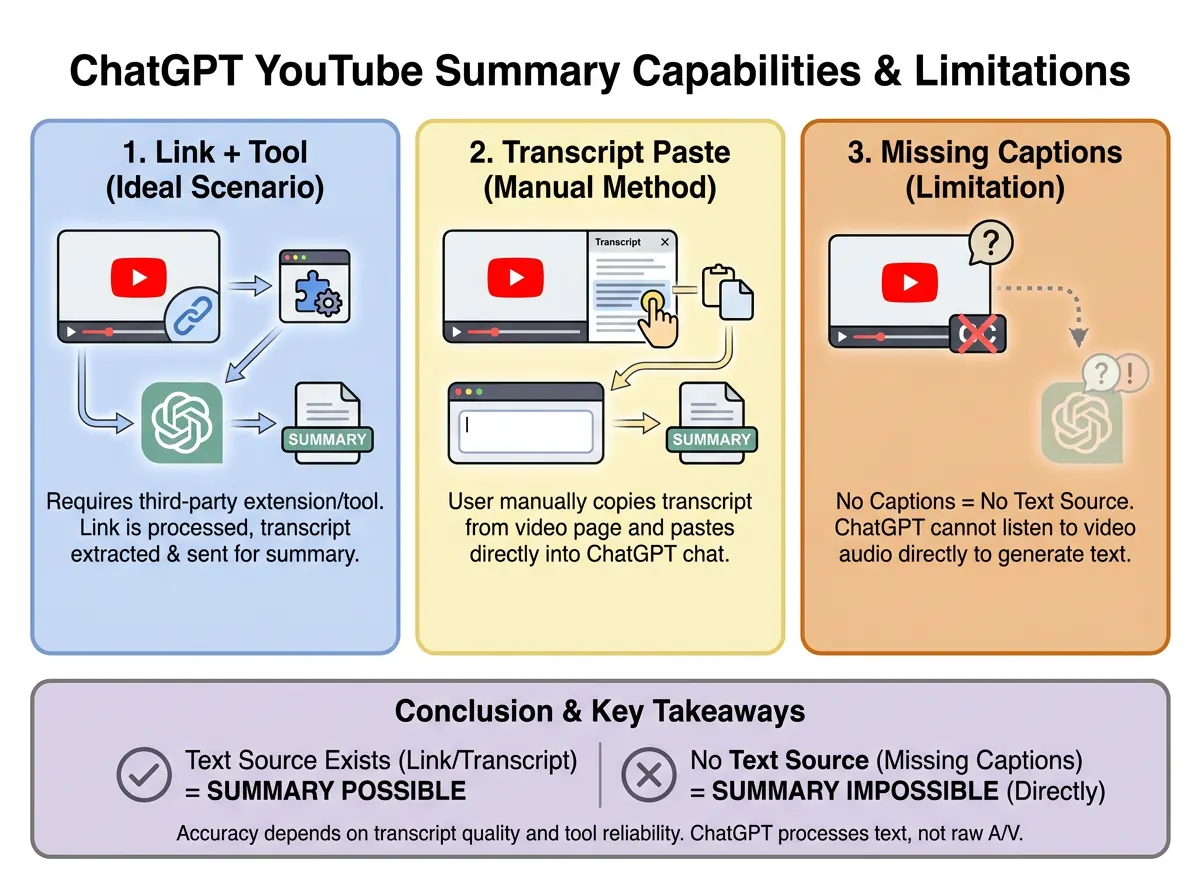
Yes, ChatGPT can summarize a transcript you provide. A YouTube URL alone is a different input: a plausible response does not prove that ChatGPT retrieved the video's words or analyzed its audio. Start by checking what source is available, then choose the workflow below.
If you need the source text first, open the YouTube transcript tool. If you want a video-to-notes workflow, use the YouTube summarizer.
What we actually checked
On September 12, 2026, we used ChatGPT in Chrome, in a temporary chat with the interface set to Instant. We supplied Stanford's Steve Jobs commencement video, asked for the first 90 seconds, and required source access to be disclosed before summarization. ChatGPT searched, then reported that only metadata was accessible and declined to produce a source-verified summary or timestamps.
Next, we supplied an original four-line fictional transcript about reviewing a course. ChatGPT preserved its timestamps, separated a cancelled plan from the final decision, and kept the owner and deadline unspecified. This was a text-input check, not the Stanford video's transcript.
| Input | Observed outcome | What this establishes |
|---|---|---|
| One public YouTube URL | No verified spoken content retrieved in this session | Link access can fail even when the video is public |
| Our timestamped test text | Three bullets with the decision and uncertainty preserved | Supplied text can support a checkable summary |
| Captionless audio or a video attachment | Not tested here | No conclusion about transcription accuracy |
This small check is not a success-rate benchmark or a verdict about every account, model, video, or browsing tool. The interface did not expose an underlying model identifier.
Exact text supplied in our check
This original test input is unrelated to the Stanford video. The English below is the text we actually submitted.
[00:00] Today we compare two ways to review a course: rereading notes and answering practice questions.
[00:20] We initially proposed rereading for forty minutes, but cancelled that plan.
[00:40] The final decision is to answer five practice questions, then review only the mistakes.
[01:00] No owner or deadline has been assigned. The next check should compare mistakes before and after the exercise.
Method 1: try the link, but verify access
Paste the URL into a new conversation and use this prompt:
Use only this video: [URL].
First say whether you can access its audio/video, a transcript,
or only the title, description, and search results.
Summarize the requested section only from accessible source content.
Include timestamps only when verified. If the source is unavailable,
say so instead of reconstructing the video from memory.
Inspect the response for evidence from the requested section. A familiar title, channel name, or generic list of ideas is not enough. If it says the transcript is unavailable, switch to text input. Repeatedly demanding that it “watch again” does not supply the missing source.
Method 2: provide the existing transcript
- Open the video on YouTube and look for Show transcript in the expanded description, when available. YouTube documents transcripts for videos that have captions in its transcript guide.
- Choose the appropriate language. Keep the timestamps and note whether the captions are creator-provided or automatically generated.
- Copy the text into ChatGPT, or attach a supported text document. OpenAI documents text-file summarization in its file upload guide.
- For a long lecture, divide the text at topic changes. Label each section and retain its original timestamps. Ask for section summaries before a combined overview.
- Replay important claims, names, numbers, and quotations in the original video before reusing them.
Use this prompt with the supplied text:
Summarize only the transcript below.
Return: a short overview, chapter bullets with source timestamps,
key examples, and unresolved questions.
Separate proposals, cancelled options, and final decisions.
Do not invent a speaker, owner, deadline, quote, or timestamp.
Mark uncertain source wording as “check the recording”.
Method 3: handle missing captions
Without a usable caption track, you need speech transcription before a dependable text-based summary. Use the captionless video workflow, review the transcript, and then provide that text to ChatGPT.
Video attachments are another possible route where the account and upload method support them. OpenAI's current video-input guidance describes support with limitations; acceptance of a file does not establish complete audio or video coverage. We did not test an attachment here. Check the current interface and documentation rather than assuming fixed duration or plan allowances.
Speech-only notes also miss information shown silently on slides, diagrams, or demonstrations. Add your own observations from those scenes and label them separately from the transcript.
A repeatable quality check
For a small text check, write four timestamped lines containing a proposal, its cancellation, a final decision, and an explicitly unknown deadline. Ask for three bullets. The result should retain the final decision, avoid reviving the cancelled plan, and leave missing details unknown. This tests handling of supplied text; it does not test audio recognition.
For a real video, verify one section near the beginning, middle, and end. Confirm that an action item is actually a commitment, not an example mentioned by the speaker. Keep exact quotes separate from paraphrases.
Save the result as useful notes
Keep the source URL, transcript language, review date, and a link to each important timestamp with the summary. If you want chapters and Markdown in the same workflow, try YouTube to Markdown, then follow the Notion and Obsidian import guide.
For Google's approach to this task, see summarizing YouTube videos with Gemini. Choose based on the source you can actually provide and the output you need, rather than assuming that every pasted link is fully understood.
About the author
SnapVee Team
Product guides
Official guides to using SnapVee's tools and exporting your results.