Reverse-engineer the video,
not just the view count.
Paste a link. SnapVee transcribes the audio, pulls the comment section, and hands back the hook, a beat-by-beat structure, why it actually took off, and a shoot brief you can film against — instead of you rewatching the same clip fifteen times.
Transcription is automatic — the video does not need captions.
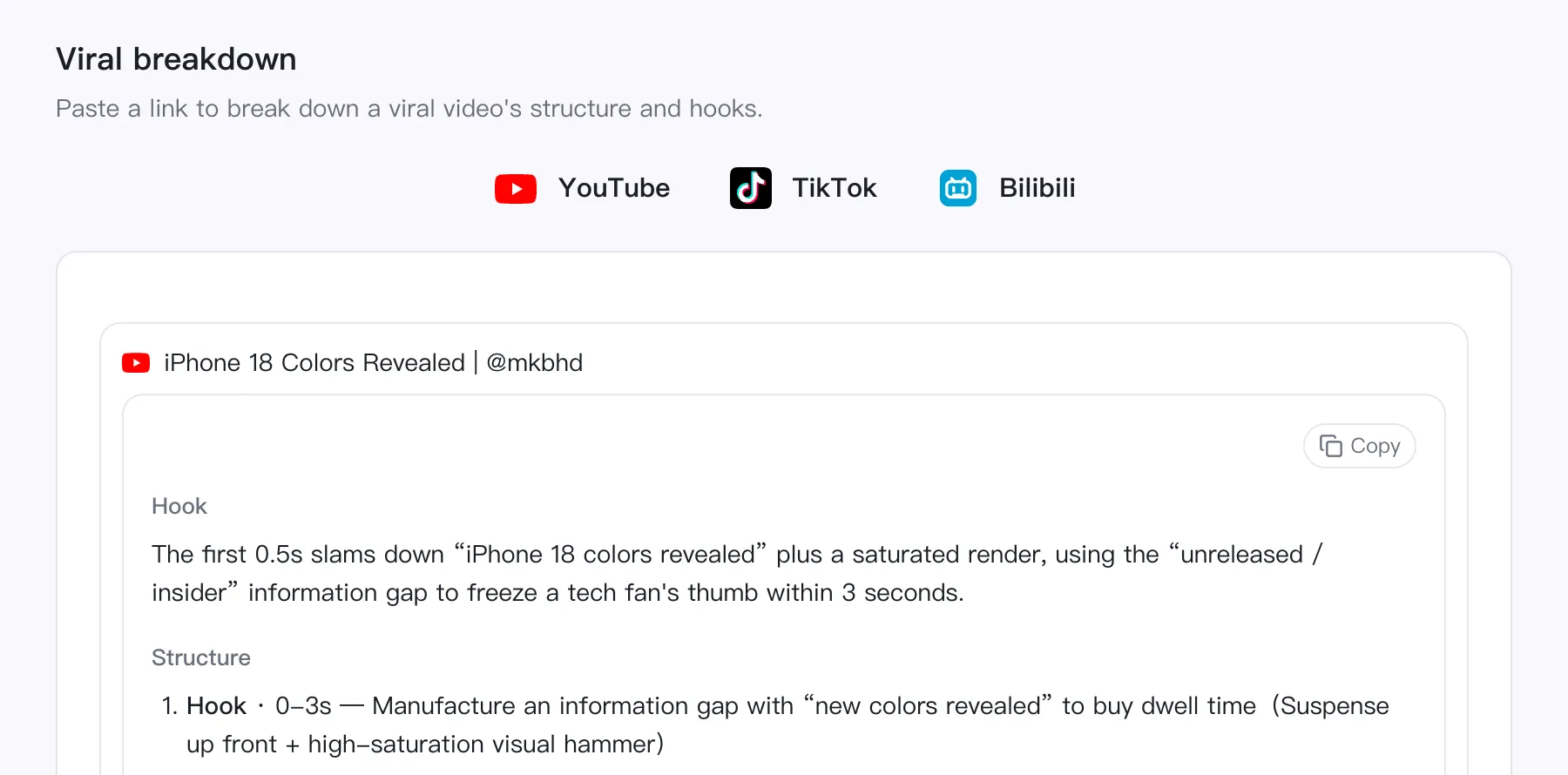
В первые 0,5 с — «раскрыты цвета iPhone 18» плюс насыщенный рендер: разрыв в информации «не вышло / инсайд» удерживает палец техноэнтузиаста за 3 секунды.
- 0-3sХук — Создать информационный разрыв через «новые цвета раскрыты» и удержать зрителя
- 3-10sРазгон — Показывать цвета по одному, по 1-2 секунды, создавая ощущение «это ещё не всё»
- 10-20sКульминация — Выдать самый спорный цвет с личной оценкой, чтобы комментарии разделились на лагеря
- 20-25sПризыв — «Какой цвет хотите? Напишите в комментариях» — вовлечение сразу в комментарии
You'll sign in first — your link comes with you.
Inside the workspace
This is what a breakdown looks like
One link in, and out comes the hook, the structure cut into timed segments, and why the thing took off — every segment says what job it is doing, so it can be rebuilt.
- Hook and structure
- How the first three seconds hold people, then the whole video split into timed segments.
- Why it went viral
- Information gap, a divisive angle, riding a big name — named one by one, not just 'good content'.
- Formula and shot brief
- A formula you can reuse and a shot-by-shot brief: swap in your own topic and start filming.
Watching it again won't tell you why it worked.
A viral video hides its craft: the hook is three seconds long, the pacing is deliberate, and the comment section is where the real reason lives. A breakdown separates what the creator did from what the algorithm did, and turns the difference into something you can repeat.
Hook anatomy
What the first three seconds actually promise, and which information gap keeps a thumb from scrolling past.
Beat-by-beat structure
The video split into segments with rough timestamps, each with the job it does and the technique it uses.
Why it took off
Attribution with evidence — pulled from the transcript, the title, the metrics and the comments, not from vibes.
Replication formula
The repeatable pattern underneath, written so it survives a change of topic, plus where to differentiate instead of copying.
Shoot brief
Topic, script skeleton, key shots and a hook line — enough to open a camera without another planning meeting.
Batch and find the pattern
Analyze up to four videos at once and get a shared-pattern pass on top: what every hit in the batch has in common, fused into one formula.
Four steps, one link
No account setup beyond signing in, no editing, no manual transcript cleanup.
Paste the link
A YouTube, TikTok, Douyin or Bilibili URL. One per line if you're batching.
We fetch the content
Captions when the platform has them, automatic transcription when it doesn't, plus the top comments for context.
AI breaks it down
One pass over transcript, metadata, metrics and comments, returning a structured report — not a wall of prose.
Carry it into production
Send the brief straight into scripting, formatting or a cover image without retyping it.
What a breakdown report contains
Every run returns the same sections, so two videos are actually comparable.
- 1Хук
- 2Структура
- 3Почему зашло
- 4Аудитория
- 5Формула повторения
- 6Отличие
- 7Бриф на съёмку
The report is written in your interface language, whatever language the video is in.
What users say
Creators, agency teams, and producers who take a reference video apart before they shoot.

“Three videos beat mine last week. I ran all three and the difference was the first fifteen seconds, not the thumbnail I kept redoing.”

“Before a pitch I break down the competitor posts that actually performed. The conclusions come with evidence, so they go straight into the deck.”

“I paste a reference video and get a shoot brief back. Writing starts from a structure instead of a blank page.”

“Three posts in a row went flat. All three put the product at second eight — moving it to second three was the whole fix.”

“The videos that actually performed become a structure sheet, and our briefs get written against that instead of a vibe.”

“It tells me why a video holds people, not that the video is good.”
Same account, next step
The rest of the workflow is right here
Pull the video in, turn it into text, work the text into something you can publish — and handle the file chores on the way. No tool switching.
Questions
What it supports, what it costs, and what it can't see.
- Which platforms are supported?
- YouTube, TikTok, Douyin and Bilibili. Reddit is supported for comment analysis only — a text post has no audio to break down.
- Does the video need captions?
- No. Platform captions are used when they exist; otherwise the audio is transcribed automatically before the analysis runs.
- How is it billed?
- By transcript length, in media minutes, with a one-minute floor per video. If a run fails, the minutes are refunded automatically.
- How many videos can I analyze at once?
- Up to four per submit without a subscription; subscribers are uncapped. With two or more finished videos you also get a shared-pattern report across the batch.
- Can it see what's on screen?
- Not yet. The analysis reads the transcript, the title and description, the public metrics and the comments. A silent video with on-screen text only will produce a thinner report, and the report says so.
- Where do the reports go?
- They stay in your workbench history and in My Assets, so you can reopen a breakdown later instead of running it again.
Take a video apart
Paste a link and read the structure behind it in a couple of minutes.