How to Get K-pop Girl Group and Boy Group Photos, Videos, and Transcripts: Weverse / YouTube / Instagram
Using BTS, GOT7, and NCT as examples, turn public K-pop links into stage videos, social photos, Korean transcripts, and bilingual subtitles. Covers Weverse, BANGTANTV, and NCT unit content — and why reuploading full official MVs is a dead end.
How do you get K-pop photos, videos, and transcripts?
People searching for K-pop girl-group videos, BTS subtitles, a GOT7 downloader, or an NCT transcript usually need more than a player. Fan sites, translation teams, news pages, and editors want files they can actually use: a BANGTANTV interview, a GOT7 teaser still, a timed Korean transcript from an NCT unit live, bilingual SRT, and a script they can publish.
The hard part is not copying a URL. BTS MVs sit on HYBE LABELS, Bangtan Bomb and variety on BANGTANTV, lives on Weverse. GOT7 has an official channel plus public interviews after leaving JYP. NCT still has to be split into 127, DREAM, and WayV before you file anything. Full “reuploads” of official videos are a copyright trap. What lasts is translation, clipped commentary, recaps, and licensed reuse.
This guide puts photos, videos, transcripts, multilingual subtitles, and republishing on one 2026 workflow. The example stack is SnapVee: paste a public link to download, transcribe, and translate, then continue in video summary. Only process public content you have the right to use. Do not bypass Weverse membership, private lives, or geo-blocks.
What one public link can give you
| Source | Photos | Video | Korean transcript / multilingual subs | Best for |
|---|---|---|---|---|
| YouTube / Shorts | Thumbnails | 4K / 1080p MVs, fancams, interviews, live replays | ✅ Platform captions first, AI if missing | Archives, bilingual subs, recap scripts |
| Weverse Live / Media / Moment | Cover stills | Public lives and Media videos | Download, then transcribe | Public live clips, spoken recaps |
| Posts, Reel covers | Reels, Stories | Spoken Reels can be transcribed | Teasers, stage stills, vertical clips | |
| TikTok | Cover frames | Watermark-free shorts | ✅ Fancams, challenges, interview cuts | Vertical recaps, caption bars |
| X / Threads | Post images | Short clips | Short spoken clips | News flashes, BTS moments |
| Bilibili / Xiaohongshu | Covers | Public posts | ✅ Useful after you already have captions | Destination platforms, not the Korean source |
Weverse only accepts public
live,media, andmomentURLs. Do not try to force membership-only shows, paid concerts, or unreleased rehearsals through a third-party tool.
Why K-pop assets are unusually messy
Girl-group and boy-group content is not one platform:
- Sources are split – HYBE, JYP, SM, YG, and independents put MVs on YouTube, lives on Weverse, teasers on Instagram, and short fancams on TikTok or Shorts.
- Korean speech is a poor auto-caption – member names, agencies, album titles, chants, and Konglish get chopped.
- Many interviews and lives have no track – DownSub-style tools only grab an existing caption file and fail when none exists.
- Full reuploads do not scale – official MVs, paid concerts, and Weverse membership content belong to the labels and platforms. Uploading the whole file elsewhere gets taken down and does not build a durable account.
The stable path is public link → save what you have rights to → transcribe Korean → translate and QA → publish your own recap or clip, not a relabeled original.
BTS, GOT7, NCT: where photos, video, and captions actually live
Korean boy groups are not one channel. HYBE’s BTS, independently run GOT7, and SM’s NCT (then NCT 127, NCT DREAM, WayV) use different sources and name rules. This section is public content only — membership lives, paid concerts, and full official MV reuploads are out of scope.
| Group | Public video | Photos / teasers | Weverse | Lock these terms first |
|---|---|---|---|---|
| BTS | BANGTANTV, HYBE LABELS interviews, Bangtan Bomb, public variety | Instagram @bts.bighitofficial, public member posts | weverse.io/bts/live/ · /media/ · /moment/ | RM, Jin, SUGA, j-hope, Jimin, V, Jung Kook; agency as HYBE / Big Hit — pick one spelling |
| GOT7 | Official GOT7 channel, older JYP catalog that is still public | Group account plus JB, Jackson, BamBam public posts | weverse.io/got7/live/ · /media/ · /moment/ | JB, Mark Tuan, Jackson, Jinyoung, Youngjae, BamBam, Yugyeom; keep Ahgases |
| NCT | NCT, SMTOWN; read the title for 127, DREAM, or WayV | @nct and unit accounts | weverse.io/nct/live/ · /media/ · /moment/ | Do not mix units; NCT’s Mark is not GOT7’s Mark Tuan; Haechan, Jaehyun, Chenle break auto-captions |
Three jobs you can copy
-
BTS public interview → bilingual subs
Open a public BANGTANTV interview → YouTube download at 1080p → YouTube transcription → fix the seven names, then export bilingual SRT. Do not upload the full Dynamite or Butter official MV to another site. -
GOT7 comeback talk → recap clip
Public Weverse Media or a YouTube interview → download the cover and file → transcribe, keep 30–90 seconds, add your title and source credit. -
NCT unit live → outline, then captions
Confirm 127 vs DREAM vs WayV; file asNCT/127/orNCT/DREAM/→ download the public live → video summary for chapters → transcribe chapter by chapter.
Girl-group workflows use the same “official channel + public Weverse + public IG” pattern. These three boy groups are simply the searches that blow up names in auto-captions.
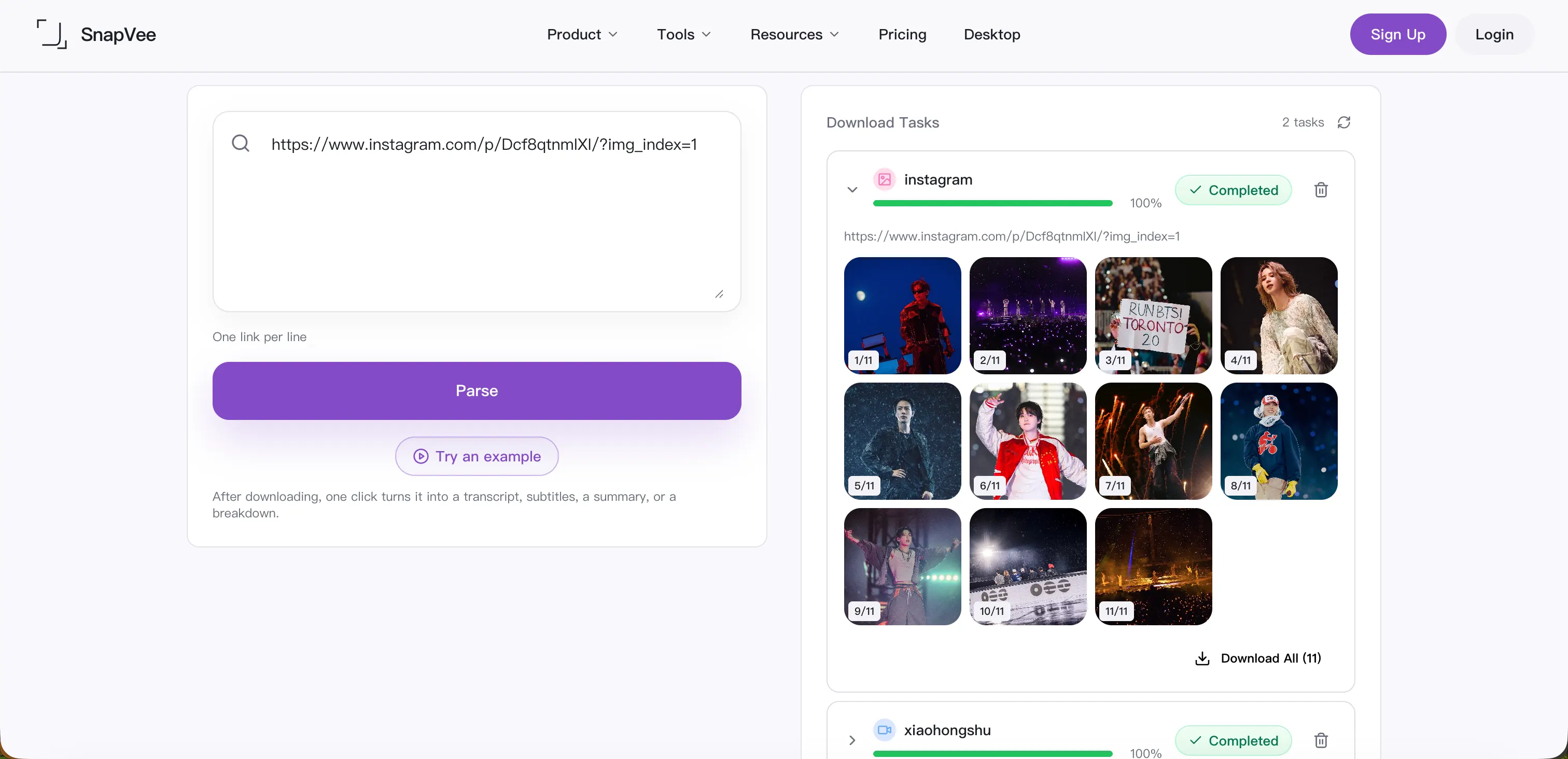
Photos: covers, stage stills, social posts
Treat K-pop images as three jobs, not one dump folder.
1. Official social stills (Instagram, Threads, X)
Use for: teaser posters, concept photos the account posted publicly, schedules, member selfies they chose to publish.
- Open a public post and copy the full URL.
- Open the Instagram downloader or the SnapVee download workbench.
- Paste the link and wait for photos or Reels to resolve.
- Save carousel images one by one; for Reels, keep the video and the cover frame.
Private accounts, expired Stories, and close-friends content will not parse. Paid photobooks and shop assets are not free stock.
2. Video covers and frames (YouTube, Weverse)
Use for: recap thumbnails, timeline stills, clip posters.
- YouTube: save the thumbnail after parse; for a specific stage moment, download the file and frame-grab in an editor.
- Weverse: public Live / Media results include a cover still (often prefixed
weverse), which is easier to file next to YouTube assets.
3. Make your own publish covers — do not fake official portraits
On YouTube, TikTok, or blogs, the thumbnail often matters more than the source post. Use an AI social image pack for clean 16:9, 9:16, and 1:1 title-safe covers. Do not ask a model to “draw member X” as if it were an official concept photo.
- Do: stage lighting, mics, light sticks, album palettes, empty title areas.
- Don’t: impersonate official concept photos, forge autographs, or generate a recognizable idol face to clickbait.
Sizes are in the AI social image pack workflow.
Filing tip: group/member-or-unit/date/platform-type, e.g. BTS/2026-09-10/bangtantv-interview.srt, GOT7/jackson/2026-09-10/ig-post.jpg, NCT/127/2026-09-10/weverse-live.mp4. Keep stills, video, and SRT for the same comeback in one folder.
Video: MVs, fancams, lives, interviews
YouTube: official MVs, stages, interviews, live replays
- Open a public video and copy the share link.
- Open the YouTube 4K downloader.
- Paste and wait for audio and video to mux.
- Pick resolution by job: 1080p is enough for recaps and talking-head interviews; use 4K when costume and lighting detail matter.
- Play the first 10 seconds. For vertical posts, crop 9:16 in the editor instead of downloading the smallest file.
Long lives and batch fancams are more reliable on Desktop. If a job fails, check that the video is public, not members-only, and not geo-locked. Full troubleshooting: YouTube Downloads: Quality Options and Plan Limits.
Weverse: public Live, Media, Moment
Weverse is the source people skip. SnapVee currently matches public URLs like these boy-group prefixes:
- BTS:
weverse.io/bts/live/...·weverse.io/bts/media/...·weverse.io/bts/moment/... - GOT7:
weverse.io/got7/live/...·/media/·/moment/ - NCT:
weverse.io/nct/live/...·/media/·/moment/(127 / DREAM / WayV share the NCT artist page — split by title)
Paste into the download workbench, then download after title, cover, duration, and resolution appear. Membership walls, paid tickets, and login-only rehearsals will not and should not be bypassed.
TikTok / Instagram Reels / Shorts
Vertical fancams, challenges, and behind-the-scenes go through TikTok or Instagram. If you will burn captions, keep a watermark-free file so the caption bar does not sit on a watermark.
Transcripts: Korean source, translation, bilingual subtitles
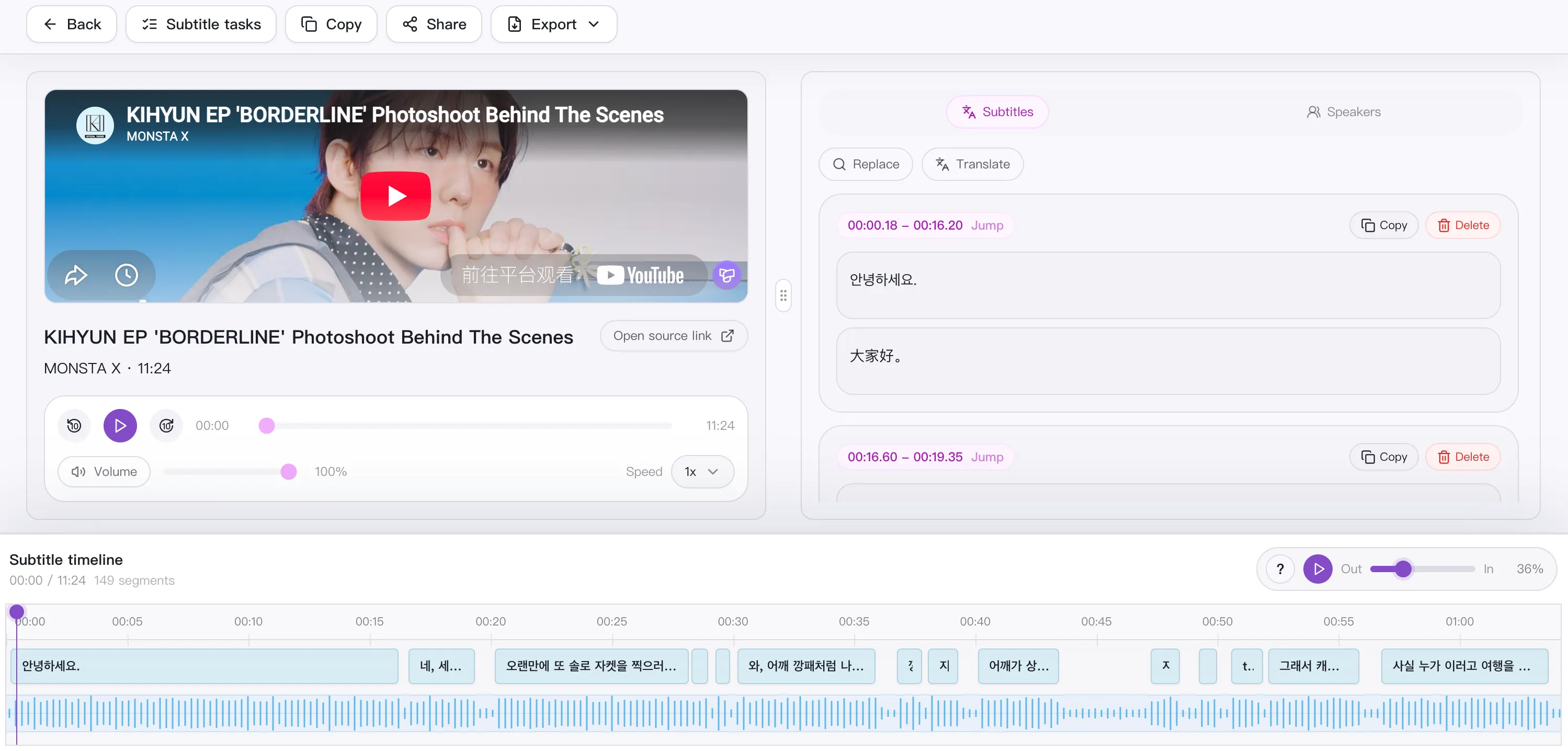
This is the valuable step. Dance MVs can have almost no speech. Interviews, live replays, variety, and Q&A without a transcript stall translation teams and recap pages.
Why YouTube auto-captions are not enough
- Member, agency, and album names get split wrong.
- Konglish, chants, and onomatopoeia have no stable rendering.
- Caption downloaders fail when no track exists.
- Auto-translate is fine for skimming, not for publishable Korean–English or Korean–Chinese subs.
How SnapVee transcribes
- Open Subtitles. YouTube sources can use YouTube transcription; TikTok uses TikTok subtitles.
- Paste a public link. If Weverse (or another source) is download-only, save the file first and upload it.
- Pick the output language you will publish in: English, Simplified Chinese, Traditional Chinese, Japanese, Spanish, Portuguese, Vietnamese, and more. Korean speech still produces a timed source track, then a segment translation.
- QA Korean first, then the translation. Keep a short glossary: BTS’s seven stage names, GOT7’s seven English names, NCT unit names plus Mark / Haechan / Jaehyun. Add agency, album, show titles, fixed chants.
- Use source / translation / bilingual views. Fix long lines, broken names, and drift.
- Export SRT, VTT, ASS, Markdown, TXT, or JSON. Burn-in uses SRT/VTT; docs use Markdown; bilingual publishing uses the bilingual track.
Limits: Free up to 60 minutes per item, Pro 180. Split lives longer than an hour into chapters first.
If there are no captions, do not retry a captions-only downloader. See Best YouTube transcript tool in 2026 and the bilingual subtitle guide.
Korean QA checklist
- Member names match the official English (or hanja) spelling in one article.
- Agency, studio, and show titles stay official.
- Number jokes, chants, and lyrics: keep Korean when translation kills the joke.
- Captions should not cover faces; on 9:16, move them up.
- Bilingual means two languages per line, not three stacked.
Cross-platform publishing: translate and recap, do not dump the full official file
“Reupload the whole MV to another site” is unstable in 2026. Labels file claims, platforms throttle, and the account does not compound.
Workflows that last:
| Type | What you publish | How you use the original |
|---|---|---|
| Translated clip | 30–90s interview beat + bilingual subs | Short excerpt plus your title and context |
| Recap / news | Comeback schedule, track notes, live takeaways | Video summary for an outline, then your copy |
| Reaction / commentary | Your voice as the A-roll | Short quotes, not a substitute for official viewing |
| Fan-sub (in-scope) | Captions you have rights or fair-use room to add | Credit the source; do not pretend to be the label |
| Licensed reuse | Written OK from the label, show, or artist team | Stay inside the grant |
Do not:
- Upload a full official MV (for example BTS’s Dynamite, an NCT title track) or Music Bank / M Countdown broadcast.
- Bypass Weverse membership, paid lives, or ticketed replays.
- Treat leaked fancams or unreleased footage as “exclusive.”
- Strip watermarks and pass the clip off as your own cam.
One legal path to several platforms
- Collect only public URLs you have rights to use.
- Download video and cover; file them locally.
- Transcribe Korean, translate, export bilingual SRT.
- For a written recap, send the same link to AI video summary for chapters and timestamps.
- Rebuild per platform instead of pasting the full file:
- YouTube: commentary long-form or Shorts with your QA’d track.
- TikTok: one beat, not a four-minute interview at full length.
- Bilibili / Xiaohongshu: clipped recap plus source credit; see Xiaohongshu.
- Design your own title-safe cover. Do not steal an official concept photo as a “custom thumbnail.”
The value is translation, selection, and explanation — not a new player around someone else’s master.
SnapVee steps (use this order)
- Open the download workbench.
- Paste a public YouTube, Weverse, Instagram, TikTok, or X link.
- Check title, cover, duration, and resolutions.
- Photos: save the cover or post images.
- Video: pick 1080p or 4K; confirm A/V before you keep the file.
- Text: send the same link to Subtitles and choose the output language.
- Fix Korean names and terms first, then the translation.
- Export SRT (edit) and Markdown (article).
- Outline: run video summary.
- Covers: AI image in each ratio — no fake portraits.
Download, subtitles, and summary share one account. Browser works on Mac and phones; use Desktop for batch lives.
Copyright and membership
SnapVee is for public links and files you are allowed to use:
- Official MVs, broadcasts, and label cams belong to labels and networks; full republishing needs a license.
- Do not bypass Weverse membership, paid lives, or encrypted replays.
- Fan cams still belong to the person who shot them; credit and follow their rules.
- Your translation is new text, but it still depends on the video; keep the source and do not brand it “official subs.”
- Commercial use (ads, shop, paid community) is stricter than personal archives — ask first.
Offline study and internal translation QA can justify saving a public interview. Public posts should be short excerpt + your commentary + credit.
Who this is for
- Sub teams – timed Korean plus bilingual QA, not a fight with auto-captions.
- Fan sites / news pages – stills, video, and live takeaways in one pass.
- Editors – 1080p/4K plus a subtitle timeline for a clip library.
- Multilingual accounts – one Korean interview → EN / ZH / JA / ES / PT / VI tracks.
- Viewers who only need to understand – skip 4K; use summary or a transcript.
Not for: reuploading full MVs for views, opening membership lives, or scraping official photobooks for sale.
FAQ
Can I download everything on Weverse?
No. Public Live / Media / Moment only. Membership and paid shows are out of scope.
The interview has no captions.
Skip caption-only downloaders. Use Subtitles; it falls back to speech-to-text.
Names keep coming out wrong.
Lock the Korean track first. Keep a replace list for members and albums, then fix in the bilingual view.
Can I upload a full official MV to another site?
Don’t. Full official files get claimed. Clip, recap, or get a license.
Can I use official photos as commercial covers?
Usually no. Design your own, or generate a non-portrait background with title space.
Several languages at once?
Pick one target per export, then run additional tracks from the same Korean source. Mixing three languages in one line is worse than separate files.
Wrap-up
K-pop girl-group and boy-group photos, videos, and transcripts are not missing a single download button. They need a cross-platform, QA’d, multilingual path: YouTube for masters, Weverse for public lives, Instagram / TikTok for stills and verticals, then a subtitle bench for Korean and bilingual SRT.
Dumping a full official MV on a second site is not a business. Turning a public link into editable assets — then into translated clips and credited recaps — is. Start with SnapVee download, add subtitles, and pull an outline from video summary when you need one.
Try it: paste a public K-pop link →
Related:
About the author

Jason Jiang
Product and engineering lead
Maintains SnapVee's core product features, ships platform support and product updates, and writes official tutorials and comparison content.