Subtitle Transcription Guide: Platforms, Workflow, Bilingual QA, and Export
SnapVee subtitle transcription supports YouTube, TikTok, BiliBili, Xiaoyuzhou, Apple Podcasts, Ximalaya, and local files — learn how to transcribe, translate, run bilingual QA, edit the timeline, and export SRT, VTT, Markdown, and more.
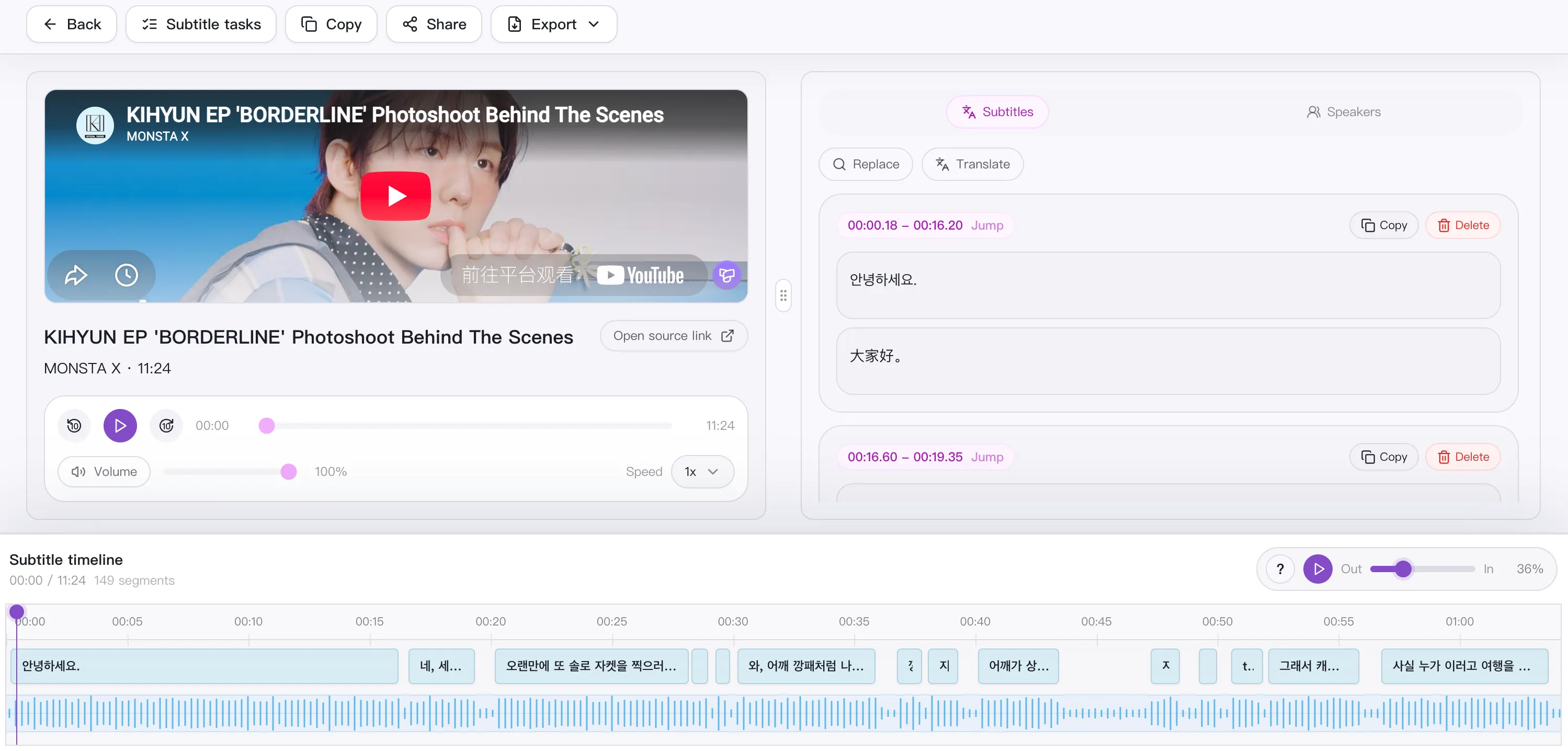
Subtitle transcription is more than turning speech into text. A reliable flow has to cover multi-platform intake, accurate transcription, segment-by-segment translation, bilingual QA, timeline editing, and export to subtitle files you can drop straight into editing and publishing.
Open SnapVee Subtitle Transcription to send links or local files through one subtitle queue and get source, translated, and bilingual views.
Which platforms are supported
Subtitle transcription accepts two kinds of sources:
- Platform links: YouTube, TikTok, BiliBili, Xiaoyuzhou, Apple Podcasts, and Ximalaya.
- Local files: upload local audio or video directly.
The tool prefers a platform's existing captions; when none are available it automatically falls back to AI speech transcription, so every source still yields a timestamped source transcript.
How to use it
- Open Subtitle Transcription.
- Paste an authorized public link, or upload a local audio/video file. For batches, use one link per line.
- Choose the target output language.
- Wait for transcription, translation, and subtitle preparation.
- Review the source transcript first — it's the baseline for the translation.
- Switch to the bilingual view to compare source and translation together.
- Fix long lines, names, terminology, and timing.
- Save your changes before exporting.
Per-item duration limit: up to 60 minutes on Free, up to 180 minutes on Pro. For long videos, check your remaining minutes first and leave time for QA.
What you can do after transcription
Transcription is only the start. Once you have the timestamped source transcript, you can:
- Translate into a target language: translate segment by segment while preserving the timeline, so text stays aligned with speech.
- Run bilingual QA: switch between source, translated, and bilingual views to check meaning line by line.
- Edit timing and segmentation: adjust long lines, break points, speaker labels, and timestamps.
- Export multiple subtitle formats: ready for a video editor, a player, or a publishing workflow.
- Turn it into a script or transcript: convert spoken content into editable text.
- Pair it with understanding: when the goal is understanding rather than publishing, use Video Summary for an overview, chapters, keywords, and a mindmap.
Bilingual QA checklist
| Check | Why it matters |
|---|---|
| Names and brands | Automatic translation should not rewrite proper nouns inconsistently |
| Technical vocabulary | Product, course, and domain terms need stable wording |
| Reading length | A translated line is often longer than the source and may need trimming |
| Segment meaning | Source and translation should describe the same spoken segment |
| Timing | Text should appear with the matching speech and end before the next line |
| Save before export | Save every edit before generating the final subtitle file |
Recommended order: fix the source first, then review the translation. If the source line has the wrong name or a broken sentence, translation only amplifies it. After the source is clean, move to the bilingual view: compress lines that are too long, keep terms consistent, clean up overlaps between adjacent segments, and recheck the first minutes plus a few sections later in the file.
Which export formats are supported
Subtitle transcription exports several formats to fit editing, publishing, and reuse:
- SRT: the most universal subtitle format, supported by nearly every editor and player.
- VTT: for web video (HTML5
<track>). - ASS: when you need finer styling and layout.
- Markdown / TXT: use the content as a transcript or script.
- JSON: for structured post-processing.
You can also export by view: source, translated, or bilingual, along with transcript, subtitle, speakers, and script variants.
Use cases
| Scenario | How subtitle transcription helps |
|---|---|
| Courses and lectures | Transcribe long videos and translate them into multilingual study captions |
| Interviews and podcasts | Turn Xiaoyuzhou, Apple Podcasts, and similar audio into timestamped transcripts |
| Product demos | Keep terms, numbers, and brand names stable across the subtitles |
| Short videos and creators | Produce editable captions fast for editing and multi-platform publishing |
| Cross-language publishing | Generate bilingual subtitles to reach source- and target-language viewers at once |
| Accessibility and reuse | Add captions to video, or turn spoken content into articles and scripts |
How it compares: Descript, Otter.ai, CapCut
How a subtitle workspace that lives in the browser compares with an editing suite (Descript), a meeting recorder (Otter.ai) and in-timeline auto-captions (CapCut).
| What matters | SnapVee | Descript | Otter.ai | CapCut |
|---|---|---|---|---|
| Getting started | Paste a link or upload a file in the browser | Install the desktop editor, then import | Join a meeting or upload a recording | Work inside an editing timeline |
| Best input | Public video and podcast links, plus local audio and video | Footage you recorded yourself | Live meetings and voice notes | Clips you are already editing |
| Subtitle output | Timestamped SRT / VTT — source, translation or bilingual | Transcript and captions tied to the project | Transcript and meeting notes first | Burned-in captions, subtitle files on export |
| Translation | Segment by segment with timestamps kept, bilingual SRT in one click | Available on higher plans | English-first | Auto-translate for supported languages |
| After the transcript | Summary, chapters, breakdown, social formatting — same place | Keep editing in the same suite | Meeting summaries and action items | Keep editing, then publish |
Compared against each product's publicly observable behaviour, checked August 2026. For full podcast and video editing Descript is still the more complete suite, for live meeting notes Otter.ai remains the natural pick, and for restyling captions directly on a timeline CapCut is faster.
Full comparisons: SnapVee vs Descript · SnapVee vs Otter.ai
FAQ
Can I transcribe videos that have no captions?
Yes. The tool prefers a platform's existing captions and automatically falls back to AI speech transcription to produce a timestamped source transcript when none exist.
How should I handle long videos?
Check your remaining minutes first (per-item limits are 60 minutes on Free and 180 on Pro) and leave time for QA. Keep a stable network for long jobs.
When should I use subtitle transcription vs. video summary?
Use subtitle transcription when you need a subtitle file to publish or import into an editor. Use Video Summary when you want to understand the content — overview, chapters, keywords, and a mindmap.
Related guides
About the author

Jason Jiang
Product and engineering lead
Maintains SnapVee's core product features, ships platform support and product updates, and writes official tutorials and comparison content.