How to Download Suno AI Songs: MP3, Cover Video, and Lyrics (2026 Guide)
Suno’s plain audio links stopped working in 2026. Here is what still does: save a Suno song as MP3 in three steps, grab the MP4 cover video, lyrics and cover art.
How to Download Suno AI Songs: MP3, Cover Video, and Lyrics
You generated a track on Suno that you actually like. You want it as background music for a video, as a podcast intro, or just as a backup — and then it turns awkward. The download button is not always there, "Save link as" gives you an empty file, and every tutorial that tells you to "copy the audio URL" leads to a 403 page.
It is not you. Suno changed how it serves media in 2026, and the old plain-link approach is gone across the board. This guide covers three things: which methods still work, the full three-step flow for saving an MP3 with the SnapVee Suno downloader, and how to collect the extras — lyrics, cover art, and the official cover video — in the same pass. Everything here comes from our own testing against live Suno share links, not from recycled tutorials.
1. The short answer: four ways to save a Suno track
| Method | What you get | Suno login needed | Quality | Best for |
|---|---|---|---|---|
| Suno's own download button | MP3 / MP4, limited by your plan | Yes, and it must be your own song | Original | Downloading songs from your own account |
| Browser "Save link as" | Mostly nothing — 403 or an empty file | — | — | No longer viable |
| Screen or audio recording | A re-recorded copy | No | Lossy, picks up system noise | Last resort only |
| SnapVee Suno downloader | MP3 audio, MP4 cover video, cover art, lyrics | No | Pulled from the source file, never re-recorded | Public or shared songs, and batch archiving |
Rule of thumb: if the song is in your own account and you only need one file, use Suno's button. If someone shared a link with you, or you are processing a dozen tracks, use SnapVee.
2. Why "copy the audio URL" stopped working in 2026
If you followed an older tutorial and got stuck halfway, it was almost certainly one of these three.
2.1 The audio address you can find on the page no longer downloads
The classic trick was to dig a .mp3 address out of the page and save it directly. Those addresses now return 403 — the address is still there, but it no longer serves a file to the public. That single change is why most "Suno downloader" scripts died.
2.2 The addresses that do open are time-limited
Even when an address opens for you, it expires — usually within minutes to hours. That is why a link you saved yesterday shows an error page today, and why guessing URL patterns is no longer a strategy that can work at all.
2.3 The file you get may not play
The more common outcome is that a file downloads, but no player opens it, or it turns out to be a few seconds long. What Suno serves today needs extra processing before it becomes a normal, portable file — renaming the extension does nothing, and it is not something you can finish by hand.
So there is really only one test for whether a Suno downloader still works: does it hand you a full-length file that plays as-is? If it does not, nothing else about it matters.
3. Download a Suno song as MP3 in three steps
3.1 Step 1: copy the song link
Open the track on Suno and copy the link from the address bar or the share button. Both formats work:
- Song page:
https://suno.com/song/xxxxxxxx-xxxx-xxxx-xxxx-xxxxxxxxxxxx - Share link:
https://suno.com/s/xxxxxxxx
Legacy suno.ai/song/... links are recognized too. The song must be public or shared — a private track that was never shared exposes no data to anything outside your account, no matter which tool you try.
3.2 Step 2: paste it into SnapVee
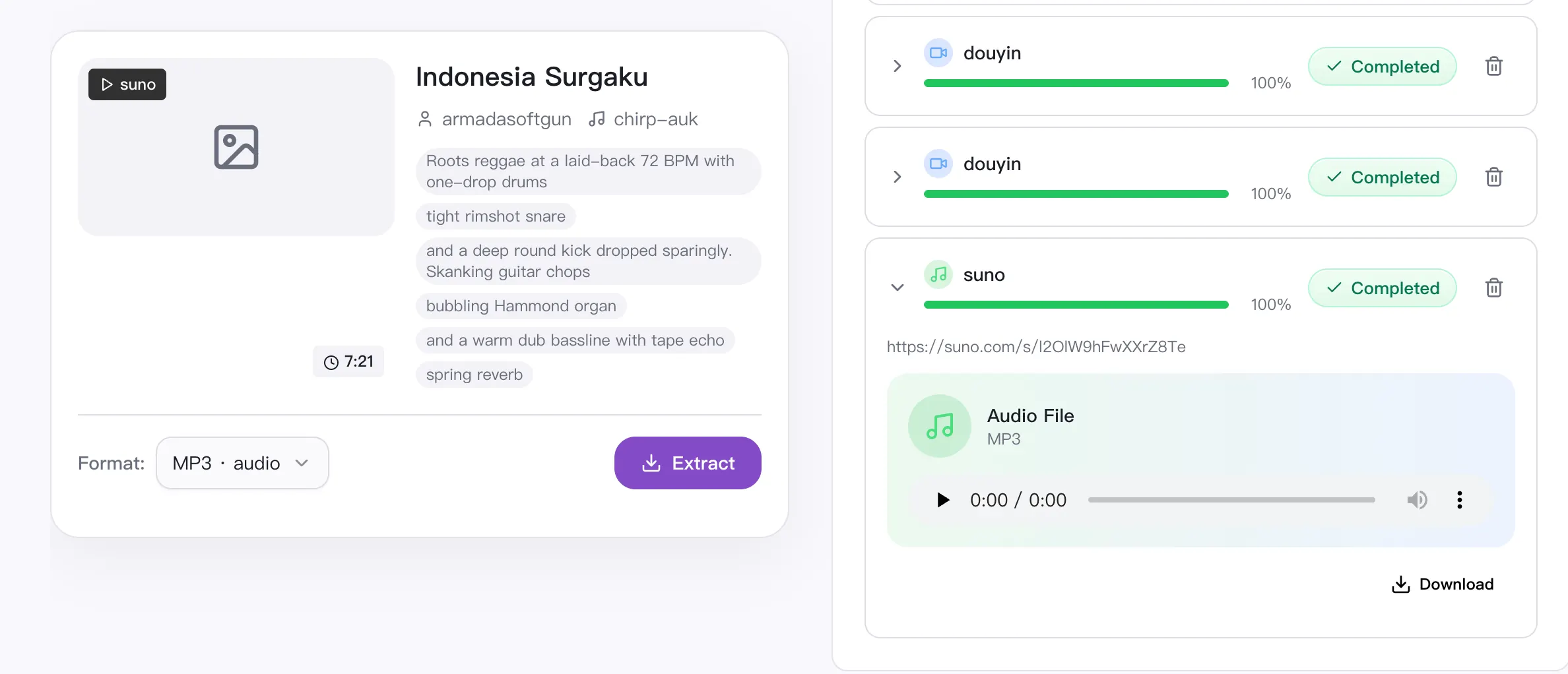
Open the Suno download page, paste the link, and hit extract. Once parsing finishes you will see the title, artist, duration, cover art, and the available formats.
Have several songs? Go to the SnapVee workbench instead and paste multiple links at once so they queue up together.
3.3 Step 3: pick a format and download
- MP3 — the right choice almost every time. It comes from the source file, not from a recording.
- MP4 — offered when the song has an official cover video (cover art plus the audio track). Handy for platforms that only accept video uploads.
Click download and the file lands locally. Mobile browsers save to your Downloads folder; on iOS it usually shows up in the Files app.
4. MP3 or MP4? One table
| Situation | Pick | Why |
|---|---|---|
| Background music in a video edit | MP3 | Editors take the audio track directly, no demuxing |
| Posting to a video-only platform | MP4 cover video | Skips building a visual yourself |
| Listening on your phone / playlists | MP3 | Smaller, and every player recognizes it |
| Podcast intro or voice-over bed | MP3 | Easier to normalize in post |
| Long-term archive | MP3 + cover art | You can always rebuild a video later |
5. Three things people miss
5.1 Grab the lyrics and the cover art too
Suno's song data usually carries the lyrics and the cover image. Both show up in the extraction result, so you do not have to copy lyrics back out of Suno by hand when you are making a lyric video, writing a description, or filling in metadata for a music platform.
5.2 Turn the song into a transcript or subtitles
Making a lyric video, adding bilingual subtitles, or want a searchable text version? Run the downloaded audio through SnapVee's subtitle transcription and export SRT, VTT, or Markdown. It works best on tracks with clear vocals — instrumentals are not worth the trouble.
5.3 Use the desktop app for bulk archiving
If you publish with Suno regularly and have dozens of tracks to archive, the SnapVee desktop app fits better: jobs run locally and files land straight in the folder you choose, with no per-file browser prompt.
6. Troubleshooting a failed download
Work through this list — it covers nearly everything we have run into:
- Is the link public? Private tracks and drafts visible only inside your account cannot be parsed from outside. Ask the creator to share it, or use Suno's own button.
- Is the link complete? Links copied out of chat apps are often truncated or wrapped in a redirect. Strip the extras down to
suno.com/song/...orsuno.com/s/.... - Was the song deleted? If a track was removed or switched to private, the link survives but the data does not.
- Is it an unusually long track? Extended songs take longer to process. Give it a moment and refresh.
- Try a different network. Some networks handle streaming CDNs poorly; switching often fixes it outright.
If none of that helps, Suno has most likely changed its delivery again — those changes are something we track and patch.
7. Rights: settle these three questions first
A downloader only saves a file; it does not change who owns what. Before you publish:
- Which Suno plan was the song generated under? Free and paid plans grant different commercial rights.
- Are you the creator? Saving a shared track to listen to is one thing; using it commercially is another.
- Where are you publishing? Music platforms, ad networks, and film/TV licensing each have their own stance on AI-generated music.
Personal listening, backing up your own work, and private creative use are generally fine. For commercial release or redistribution, read Suno's terms first.
FAQ
Is downloading Suno songs free? Saving public Suno tracks with SnapVee is free, and no Suno account is required.
Can I download a whole playlist at once? A Suno playlist page is not a song page. Collect the individual song links and paste them together in the workbench.
Is the MP3 re-compressed? It is not a recording or a screen capture — you get the song's own audio, so none of the noise or level problems that capture introduces.
Can I download only the cover image? Yes. The cover art is a separate item in the extraction result and can be saved on its own.
Does this work on a phone? Yes. The whole flow runs in the browser on both iOS and Android, with no app to install.
Can I still download a song the creator deleted? No. Once the link is dead the data source is gone, and no tool can recover it.
Wrapping up
Downloading from Suno went from "copy a link" to "genuinely hard" because Suno tightened how its files are delivered. Once you know that, you stop wasting time on outdated tutorials: use the official button for your own songs, and a tool that keeps up with Suno's changes for shared links.
To save a Suno track someone shared with you, or to archive your own catalog in bulk, start from the SnapVee Suno downloader. If you are also comparing download tools in general, see our side-by-side comparison of five popular video downloaders.
About the author

Jason Jiang
Product and engineering lead
Maintains SnapVee's core product features, ships platform support and product updates, and writes official tutorials and comparison content.