Subtitle pipeline
Automate source intake through transcript delivery so teams only step in where judgment is actually needed.
AI video transcript generator: paste a YouTube, TikTok, Bilibili, or podcast link — or upload a local file. Get a timestamped video transcript, podcast transcript, and SRT. No install.
Inside the workspace
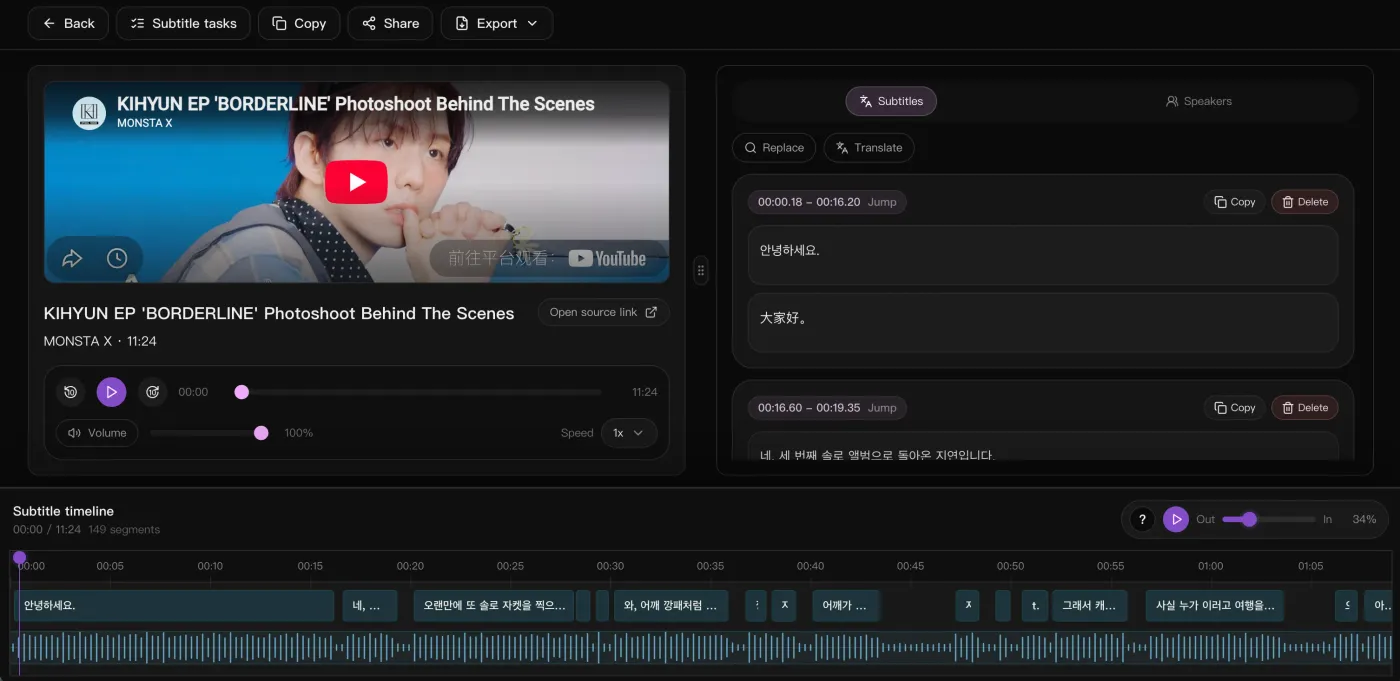
Player on the left to check the timing, editable segments on the right, and a waveform timeline underneath — you fix the line breaks before anything gets exported.
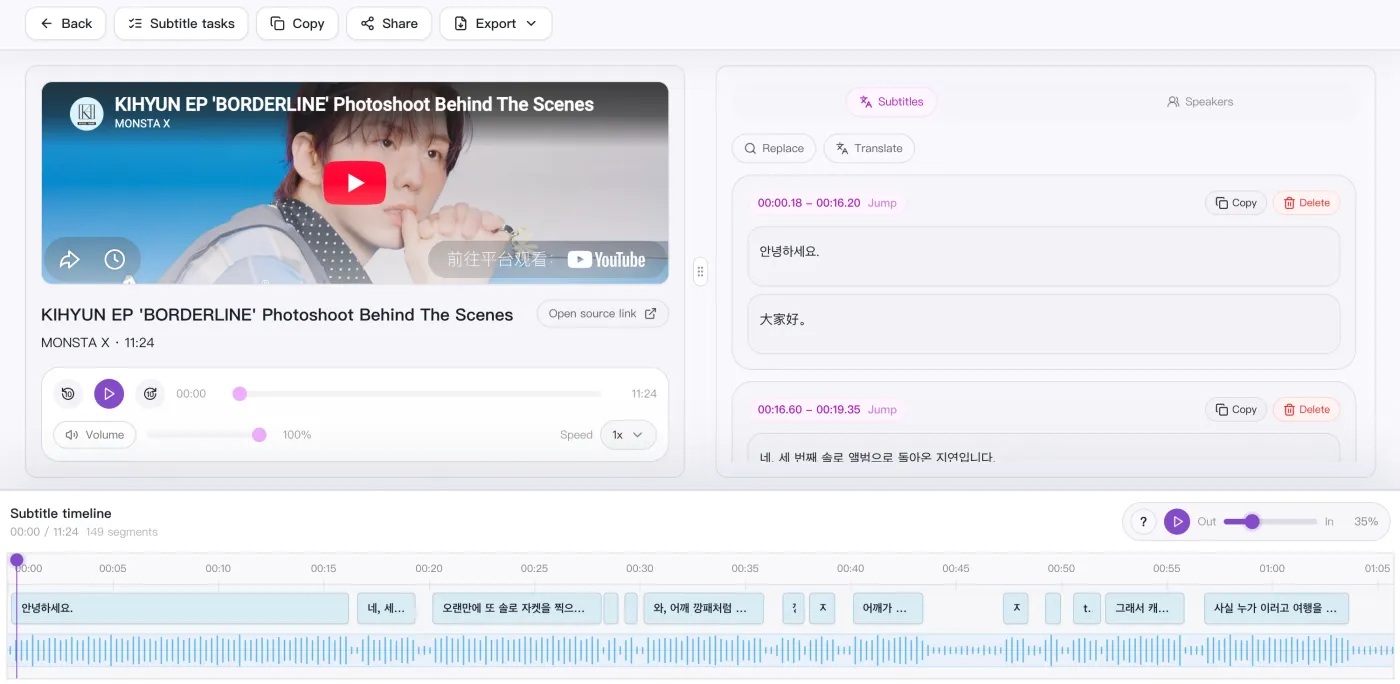
Focused on intake, transcription, translation, bilingual review, and subtitle exports.
Automate source intake through transcript delivery so teams only step in where judgment is actually needed.
Send platform URLs and local media through the same subtitle entry point and queue model.
Heavy download, transcription, translation, and export preparation steps stay in workers so the page remains responsive.
YouTube, TikTok, BiliBili, and podcast platforms reuse the existing media path, while local files go straight into the queue.
Prefer platform captions when available, then fall back to audio transcription automatically.
Translate segment by segment while preserving timestamps for direct SRT export.
Prepare downloadable subtitle export files from the source, translated, and bilingual views.
Supported platforms
Different content formats all land in the same timestamped subtitle draft for review and delivery.
Transcribe, then re-segment and rebuild subtitles by hand.
Get timestamped source and bilingual lines in one pass.
Export cleanup and re-edits eat the most time after recording.
SRT and bilingual review arrive together — one less post step.
Transcription, translation, and layout span three tools.
Review on one timeline and publish in multiple languages.
Re-subtitling for every platform you repost to.
Drop a link, get bilingual subtitles, export and ship.
Side by side
How a subtitle workspace that lives in the browser compares with an editing suite (Descript), a meeting recorder (Otter.ai) and in-timeline auto-captions (CapCut).
| What matters | SnapVee | Descript | Otter.ai | CapCut |
|---|---|---|---|---|
| Getting started | Paste a link or upload a file in the browser | Install the desktop editor, then import | Join a meeting or upload a recording | Work inside an editing timeline |
| Best input | Public video and podcast links, plus local audio and video | Footage you recorded yourself | Live meetings and voice notes | Clips you are already editing |
| Subtitle output | Timestamped SRT / VTT — source, translation or bilingual | Transcript and captions tied to the project | Transcript and meeting notes first | Burned-in captions, subtitle files on export |
| Translation | Segment by segment with timestamps kept, bilingual SRT in one click | Available on higher plans | English-first | Auto-translate for supported languages |
| After the transcript | Summary, chapters, breakdown, social formatting — same place | Keep editing in the same suite | Meeting summaries and action items | Keep editing, then publish |
Compared against each product's publicly observable behaviour, checked August 2026. For full podcast and video editing Descript is still the more complete suite, for live meeting notes Otter.ai remains the natural pick, and for restyling captions directly on a timeline CapCut is faster.
You have the transcript. Now what?
Same account, same file — summarize it, break down why it worked, convert it, clean it up. No tool switching.
“We used to transcribe podcast episodes, re-segment them, and rebuild subtitles by hand. Now the timestamped source and bilingual lines are ready in one pass.”

Daniel Brooks
Podcast Producer · Northwave Media
“For course recordings, export cleanup used to be the slowest part. Getting SRT and bilingual review together removes a full post-production step.”

Elena Fischer
Course Producer · Brightpath Learning
“For multilingual interviews, I no longer split transcription, translation, and subtitle QA across three tools. Reviewing everything on one timeline is much faster.”

Marcus Reid
Content Editor · Meridian Studio
“Our team localizes short-form video. We used to time-align subtitles by hand; now a link comes in, bilingual subtitles come out, and we export SRT straight to burn-in.”

Chloé Bennett
Localization Lead · Loomwave
“We batch-transcribe subtitles for dozens of lessons at once, with timestamps we can edit in place. Far faster than outsourcing captions like before.”

Aaron Walsh
Head of Learning · Lumina Academy
“For translating foreign-media interviews, source and translation sit on one timeline, so quoting and fact-checking no longer means jumping between windows.”

Nina Albrecht
Translation Lead · Continuum Press